
I couldn’t resist making this pun in the title. Sorry not sorry.
Of course, I don’t mean Windows OS is my go-to when working in Neovim.
What I want to show is how window picker helps me keep my flow when navigating Neovim.
The workflow
When debugging something, I often want to open a function’s declaration - not just a brief hover preview, but an actual buffer I can keep open and refer back to.
That’s not a problem - I just split the window vertically, go into the secondary window, and use LSP to go to the definition of the thing I’m interested in.
There’s even a built-in mapping for opening the definition of a keyword under the cursor in a new window: h CTRL-W_d.
The problem
One issue here is that I’m usually working with split windows, and when I want to go to a definition of a variable, sometimes I’d like to open it in a secondary window I already have open.
The other thing is that often I’m interested not just in the definition, but in references. That’s trickier because I first want to pick the one I want to follow.
For listing and picking nodes such as references I use fzf-lua. It also features file previews so I can get a quick glance at each entry. But let’s say after having a quick look I decide I want to open the file with the reference in the secondary window.
If I know that this is what I want to do beforehand, I could first focus on the secondary window and then just pick the reference that interests me to have it opened there.
But what if I only decide I want to have the reference in split window after I already started looking at the preview of it?
Picker for the win
I still ain’t sorry about those puns.
With window picker, I can finally have it both ways.
I’m in the fzf-lua picker, browsing references. The preview looks good - but opening it in the current window would mess up my layout. So instead of <Enter>, I press <M-o>.
Big floating letters appear on each open window. I tap the one I want, and the file opens there. My place in the original buffer is intact. That’s it.
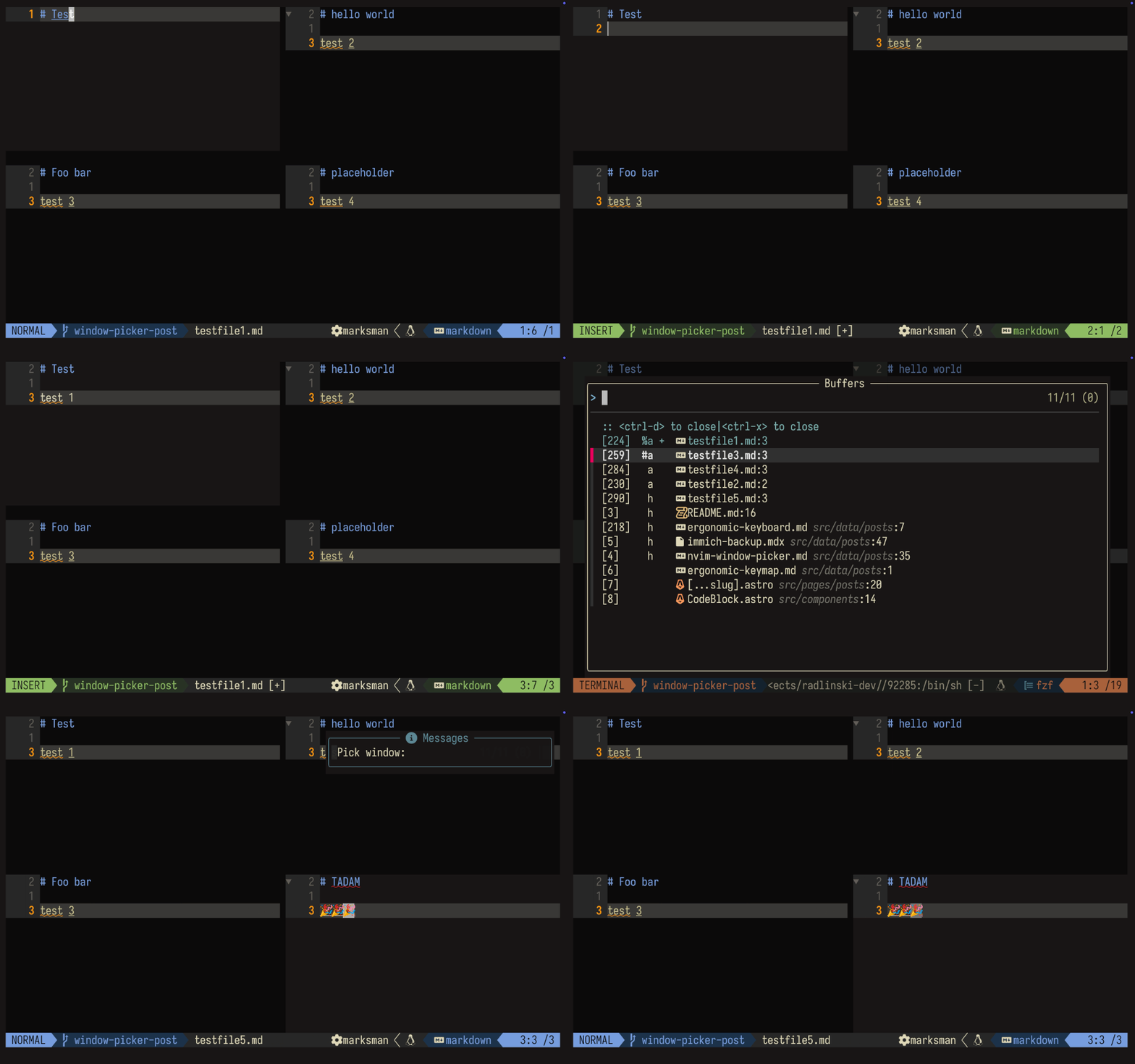
Works the same for file pickers, grep results, diagnostics - any fzf-lua source.
Here is the setup needed for the fzf-lua integration.
local actions = require("fzf-lua").actions

local function edit_in_picked_window(selected, opts)
  local win = require("window-picker").pick_window()
    or vim.api.nvim_get_current_win()
  vim.api.nvim_set_current_win(win)
  actions.file_edit(selected, opts)
end

require("fzf-lua").setup({
  actions = {
    files = {
      ["alt-o"] = edit_in_picked_window,
    },
  },
})
Other use cases
I have similar mappings done in nvim-tree configuration. I can decide in which of the currently open windows I would like the focused file to be opened.
By default, <Enter> and <Right> open files directly - fast path. But <M-o> triggers the window picker.
vim.keymap.set("n", "<M-o>", api.node.open.edit, opts("Open: with picker"))
Under the hood, nvim-tree uses the same require("window-picker").pick_window function. Same floating letters, same flow.
It’s a small quality-of-life improvement. But once you get used to it, you can’t go back.